
Short answer: YouTube has no native bulk delete for Watch Later — the only built-in option is the three-dot menu on one video at a time. To remove videos in bulk you need an extension. TidyWL adds checkboxes, select-all, and filters to the playlist, so you can clear hundreds of videos in a single pass, and it is free.
Why YouTube makes this so hard
Watch Later is the one playlist YouTube treats as a dead end. There is no multi-select, no select-all, and no bulk remove in the interface. The official YouTube Data API, which third-party tools would normally use, explicitly excludes Watch Later — so even a well-behaved app cannot touch it through supported channels.
There is a Remove watched videos option in the playlist menu, and it is worth trying first because it is free and native. It only clears videos YouTube considers fully watched, though, which is usually a small fraction of a list that grew because you never got round to watching any of it.
Meanwhile the playlist stops accepting new videos at 5,000, silently. Nothing warns you; saves simply stop working. That is covered in more depth in the 5,000-video limit explained.
The manual method, and what it costs
- Open your Watch Later playlist.
- Hover a video and click the three-dot menu.
- Choose Remove from Watch Later.
- Wait for the list to re-render, find your place again, repeat.
That is roughly three clicks and a re-render per video. For a list of 2,000 it is not a task you finish in an evening. This is the entire reason bulk tools exist.
Bulk deleting with TidyWL
- Install TidyWL for Chrome, Edge or Firefox.
- Go to your Watch Later page and click Open Dashboard.
- Click Sync to pull in the full playlist.
- Select what you want gone — individually, by dragging across a range with shift-click, by clicking a channel or topic to filter first, or with Cmd/Ctrl+A for everything.
- Press Delete and confirm.
Deletion runs sequentially, because YouTube returns a 409 Conflict when playlist edits arrive in parallel. That is a constraint on their side rather than a limit TidyWL imposes. Progress is shown live, and you can stop mid-run without losing an accurate count of what was removed.
Usually better than deleting everything
Clearing the whole playlist is the blunt option, and most people regret it. The faster fix is to delete the bulk of it and keep what you actually wanted:
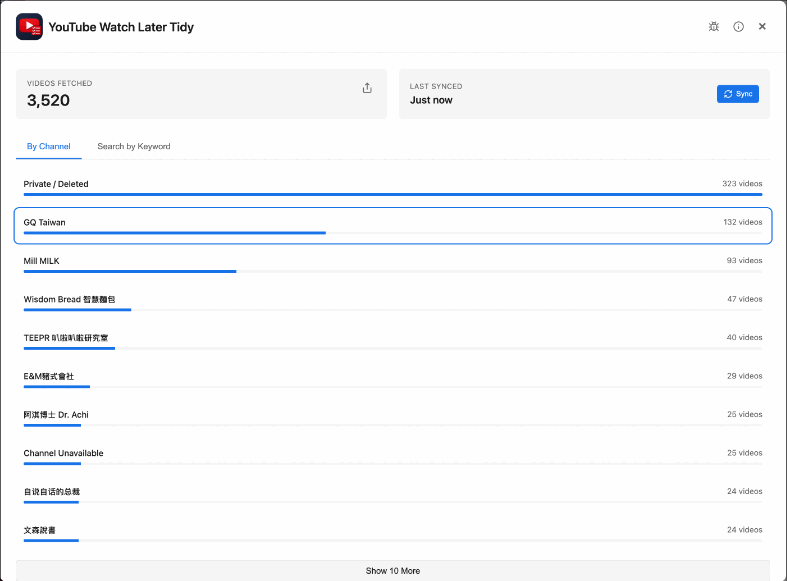
- By channel. The dashboard ranks every channel by how many videos it has put in your queue. One binge from three months ago is often several hundred videos.
- By topic. Titles are clustered by recurring keywords, entirely in your browser, so you can clear a whole subject you have lost interest in.
- Unavailable only. Deleted and private videos still count toward the 5,000 cap. Clearing them frees real space and costs you nothing.
- By length. Filter to Shorts, or to anything over an hour, or set your own minimum and maximum in minutes.
- Move instead of delete. Anything worth keeping can be bulk-moved or copied into a normal playlist, which has no 5,000 cap on saving new items to Watch Later afterwards.
Before you delete anything
Removals are permanent — YouTube offers no undo and neither does TidyWL. Export to JSON or CSV first if you want a record; it is one click and it exports whatever your current filter shows. Removing a video from Watch Later does not delete the video, touch your subscriptions, or alter your watch history.