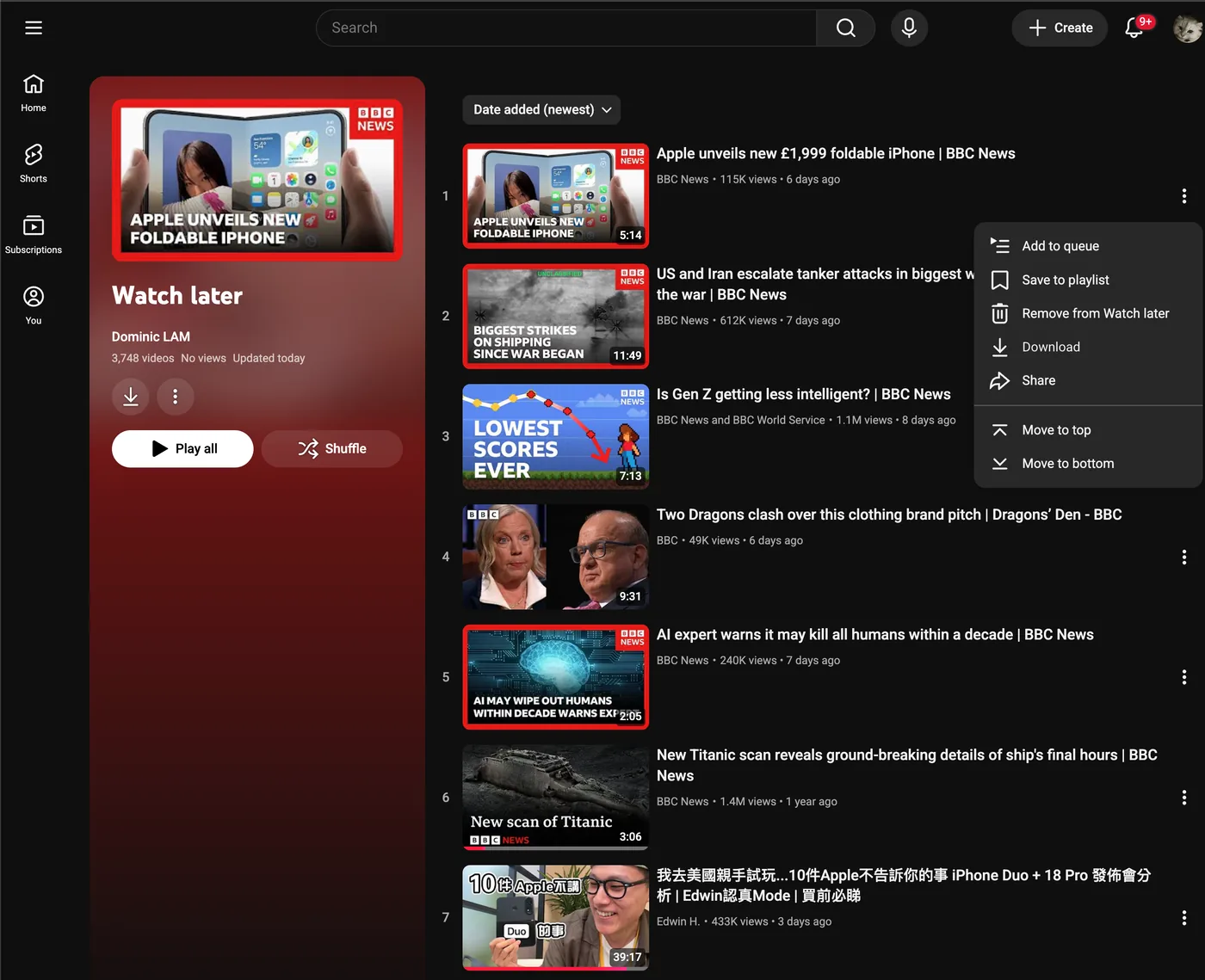
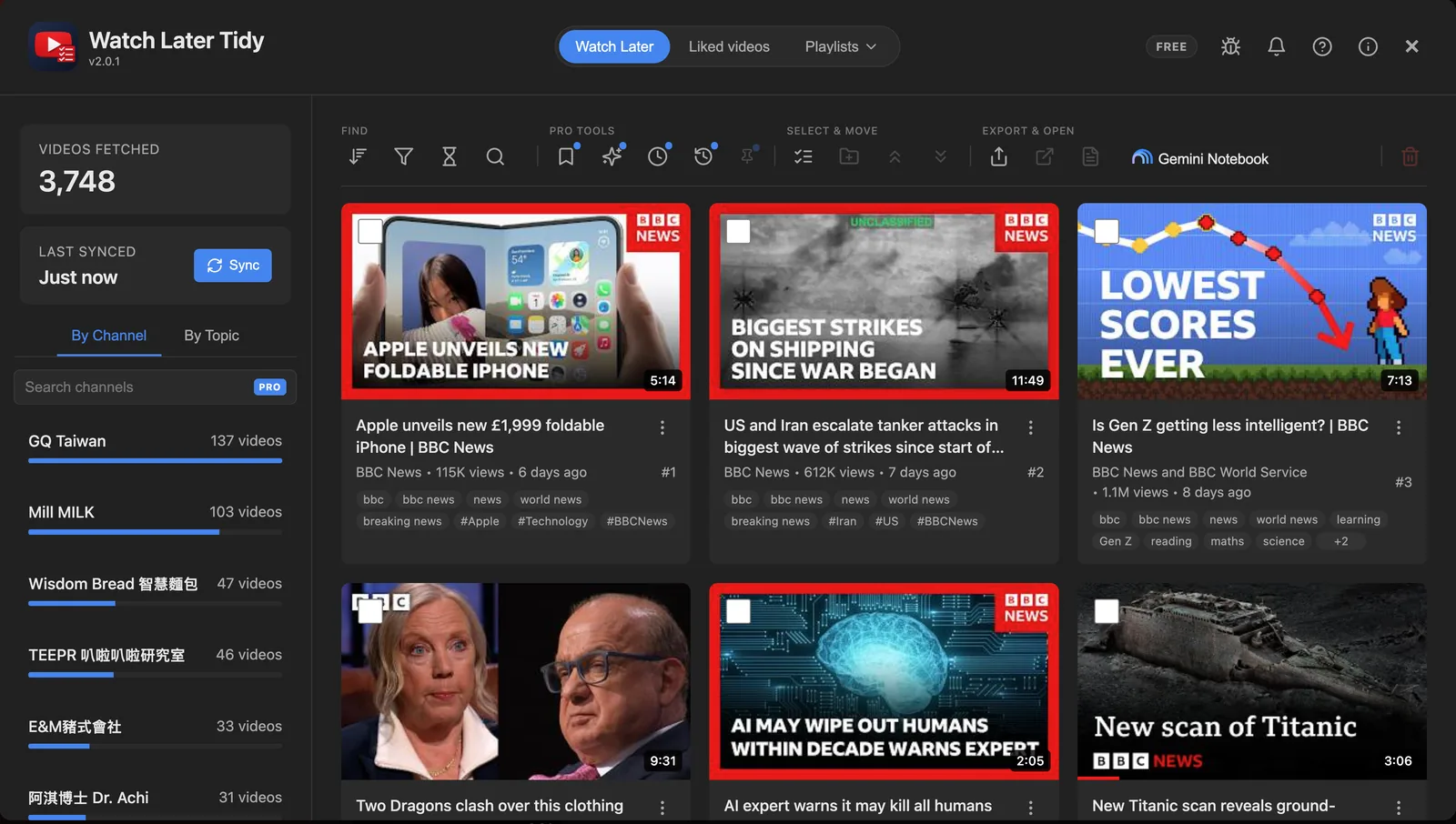
Search & filter — By title, channel, tag, length or watched
Sync in seconds — Your whole list, no scrolling
Channel & topic breakdown — See who fills your list, biggest first
Tap a channel — Its videos only, ready to clear
Watch Later, Liked & playlists — Every list you own, same tools
Bulk delete — Hundreds at once, one confirm
Tags YouTube hides — Click one to filter by it
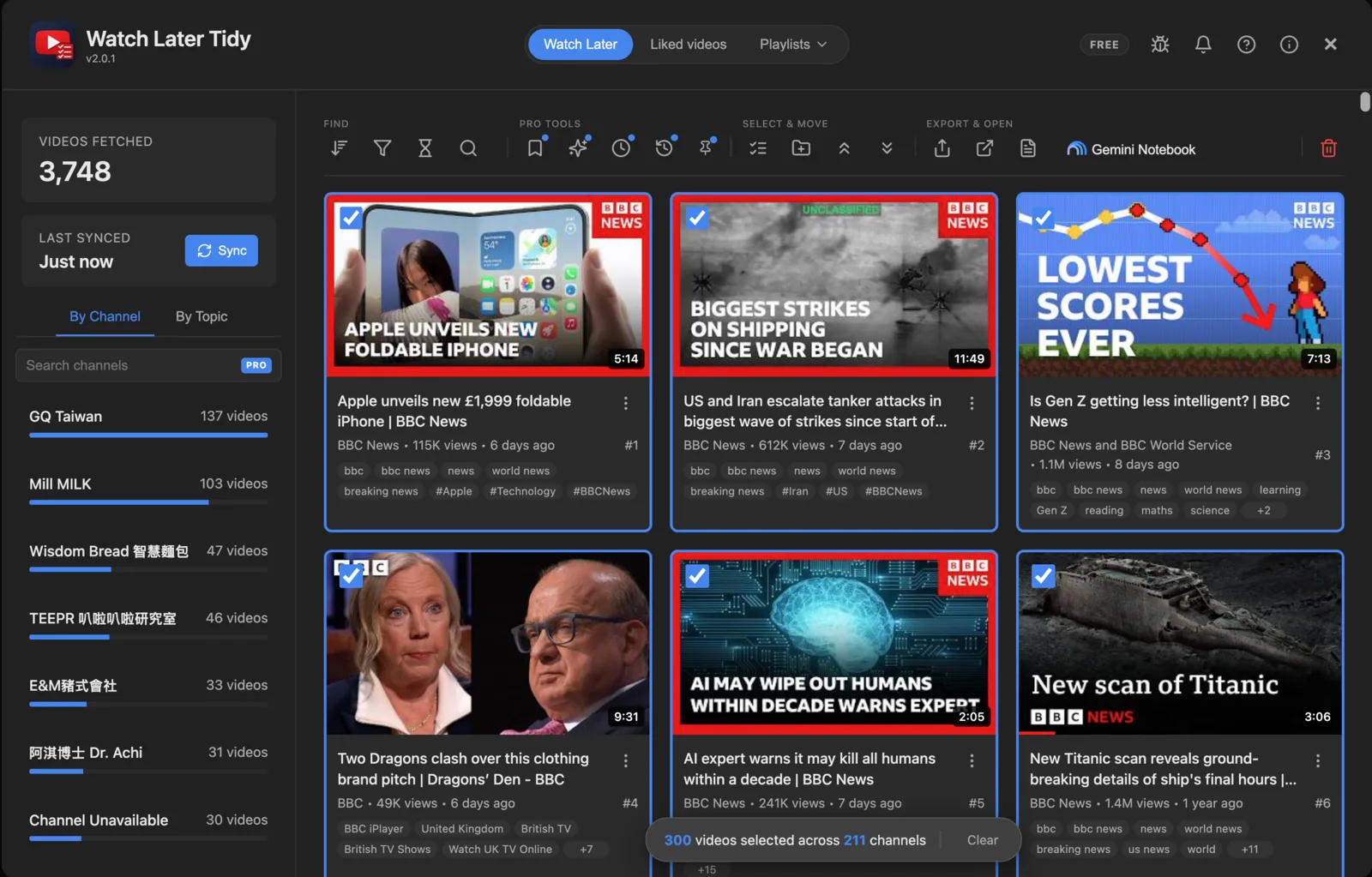
Tick, shift-click, select all — 300 picked here, across 211 channels
Search & filter — By title, channel, tag, length or watched
Sync in seconds — Your whole list, no scrolling
Channel & topic breakdown — See who fills your list, biggest first
Tap a channel — Its videos only, ready to clear
Watch Later, Liked & playlists — Every list you own, same tools
Bulk delete — Hundreds at once, one confirm
Tags YouTube hides — Click one to filter by it
Tick, shift-click, select all — 300 picked here, across 211 channels
Also: export to CSV or JSON, download transcripts in bulk, and send videos to Gemini Notebook.
Getting started takes a minute
Add it to Chrome, Edge or Firefox: Free, no account to make.
Open your Watch Later: Press Open Dashboard, then Sync.
Tick, filter, delete: Hundreds at a time.
Watch the demo
Clear your Watch Later 3 min
Search and unlike your Liked videos 2 min
Nothing loads from YouTube until you press play.
Reviews
What users are saying
★★★★★
"The dev spent DAYS solving why I couldn't get this to work and built a new version that fixed the issue, which is beyond 5-star service! And the plugin itself works PERFECTLY - so grateful for a workaround for Youtube's idiocy!"
"Perfect. I was considering making something like this myself out of frustration, I'm thankful someone already beat me to it. It's wild YouTube hasn't bothered to implement this themselves yet."
"I've been looking for a tool like this forever - a true time-saver. I really like how the extension will breakdown your list by channel, so that you can see what channels are taking up the most real estate on your list."
"By far the best extension to manage the watch later playlist on youtube, it is really easy to understand and use. Don´t get it? don't worry look the video in this page and that's all, clear as water!"
"This is the perfect extension that does exactly what it needs to do: index the watch later playlist and be able to sort by channel or topic. And most importantly bulk delete. Couldn't ask for more."
"This is actually peak!! Awesome UI and UX!!
I've been looking for something that can merge folders for ages now and finally found one that can do it automatically :)))
Tysm!"
"Very useful to filter the videos that are really useful from the watch later list and delete the ones that are not! Also, the developer was very kind helping me with a little sync problem"
"Works really well. I would appreciate a way to make the UI take the whole page so we could see more videos, List view would be nice also
And theres a reloading of pages when selecting videos for some reason, unsure if that was added to solve an issue
Apart from that its working great
How many hours has it taken you to vibecode this one?"
"I had like 5k videos on watch later and lots of them were already not really important or irrelevant at this point, there were also loads of videos I've already watched and this extension has become one of my favorite ways to handle the playlists I use. It's truly amazing, thank you!"
"Man, exactly what I needed. I move a ton of stuff to Watch Later, with the best of intentions, and they get buried quickly and I forget about them. This helped me do a purge as well as perform a better sorting by moving many to their own playlists."
"Works perfectly! I love the multiple ways to sort the list. Clean and simple UI. I wish something like this existed for the other playlists like 'Favorites' and 'Liked'."
"Это единственное работающее расширение, которое может удалять по фильтру из плейлиста. Перепробовал десятки не удаляют в лучшем случае только сортируют.
This is the only working extension that can remove filters from a playlist. I've tried dozens, but they don't delete them, at best they just sort them."
"This is a very nice extension. It's quite handy.
Note that you have to turn off the ABP (AdBlock Plus) extension if you use it, otherwise this extension( YouTube Watch later tidy), will not work. Nothing will happen when you press the button because it opens in a popup that AddBlock Plus suppresses. Other pop-up stoppers might do the same thing. (Maybe the developer can detect these ad blockers and provide a warning.)"
"1. when pressing the 3 dots on a singular video have the''add to playlist''
2. instead of scrolling all the way up to press add playlist, select all or delete, just having it stay on top while scrolling down
appart from these qol request. THIS IS THE EXTENTION I'VE BEEN LOOKING FOR FOR MY BULKY WATCH LATER PLAYLIST THANK YOU!!"
"YouTube don't provide tools to search within Watch Later, God knows why. I got 1,600 vids in Watch Later [...] But this lets you search within your history and do all sorts of stuff, and it's free."
I hit the 5,000 limit. Then I lost too many evenings to YouTube.
For years I dumped everything into Watch Later like it was a bottomless pit. Then videos I thought I'd saved stopped showing up: YouTube stops at 5,000, with no warning, and its only fix is removing them one by one. So I built TidyWL, the dashboard I wanted: see which channels fill your list, find anything in it, and clear hundreds at once.
Runs on a computer, in Chrome, Edge or Firefox. Anything you clear there is gone from the YouTube app on your phone too.
Featured by Google
Verified publisher
Free. Optional Pro from $3.99/month.
Features
More than Watch Later
Delete Hundreds at Once
YouTube makes you remove videos one by one. Tick hundreds with checkboxes and clear them in one go.
Channel Breakdown
See your Watch Later organized by channel. Find all the videos from that one YouTuber you binged three months ago in one click.
Every Playlist You Own
Not just Watch Later: every playlist you created opens in the same dashboard, with the same search, filters, bulk delete, reorder and export.
New
Liked Videos Too
Years of likes, finally searchable and filterable. Clear likes in bulk too; YouTube uses them to shape your recommendations.
Search by Video Tags
Every video shows the tags its uploader gave it, keywords YouTube stores but never shows. Search them, or click one to filter.
New
Download Transcripts in Bulk
Pick any number of videos and get one timestamped text file each, named after the video. You are told exactly which ones had no captions.
All features (15 more)
Stay Under the 5,000 Limit
YouTube silently stops saving videos past 5,000. TidyWL helps you clean out old videos so you can keep adding new ones.
Search Every Playlist at Once
Tick as many playlists as you like and see them merged: one card per video, with a chip for each playlist it lives in. Finally an answer to "which playlist did I put that in?" — and Move takes a video out of every playlist you ticked.
New
Remove Likes in Bulk
Select as many liked videos as you want and clear them in one pass, with live progress and a stop button. Worth knowing: YouTube uses your likes to shape recommendations.
Send to Gemini Notebook
Push your chosen videos straight into a Gemini Notebook (formerly NotebookLM) as sources — a new notebook or one you already have — without leaving the dashboard. It's the one feature that sends any of your YouTube data anywhere: the links you pick go to Google under your own login, and only when you click. Nothing else about your videos ever leaves.
By Topic tab
Automatically groups your Watch Later by recurring keywords in titles (e.g. "recipe", "react", "interview"). Click a topic to filter down to it, or hide it to get it out of the way — as many topics as you like. Runs 100% client-side, no API calls, no data sent anywhere.
And everything else you'd expect
Watch Progress & Filters
Filter watched, unwatched, or unavailable — and drag a slider to set how far through counts as watched. Progress bars on every card.
Richer Video Cards
Progress bar, duration badge, view count, and upload date on every card.
Open in Tabs
Open all selected videos at once as background tabs. No one-by-one clicking.
Hidden-Video Explainer
See exactly why YouTube's count differs from yours, with a reason shown per hidden video.
Search, Filter, Sort
Find videos by title, channel, watched status, availability, or duration — preset buckets including Shorts, or your own min/max in minutes. Sort by playlist order, duration, views, published date, channel, or title.
Reorder Your Way
Send videos to the top or bottom in one click, or drag and drop — single or multi-select.
Brand-Channel Support
Works on Page (brand-channel) Watch Later playlists too.
Multi-Account
Each YouTube account keeps its own separate list.
Move or Copy to Any Playlist
Move or copy selected videos to any playlist, or create a new one inline. YouTube has no bulk-move at all.
Export Your Data
Export to JSON or CSV anytime.
Plus a toolbar that stays put while you scroll, keyboard shortcuts, shift-click selection and filter chips. Works in Chrome, Edge and Firefox on a computer.
Everything above is free, with hand-picked removals capped at 1,000 every 30 days on new installs. Pro removes the cap and adds cleanup rules that run for you, 90-day undo, pinning and saved views, from $3.99 a month.
FAQ
Frequently asked questions
Yes. Everything on this page is free: sync, search, filters, bulk delete, playlists, likes, transcripts and export. On an install made from version 2.5.0 on, removing hand-picked videos is free up to 1,000 every 30 days, counted from the first one you remove; emptying a whole list never counts. Pro is optional and removes the limit, and adds cleanup rules that run for you, 90-day undo, pinning, the Lineup and saved views, for $4.99 a month, or $3.99 a month billed yearly.
Not yet. It runs in Chrome, Edge or Firefox on a computer: Windows, Mac, Linux or ChromeOS. Your Watch Later is the same list everywhere, so whatever you clear on the computer is gone from the YouTube app on your phone too.
On the free plan, no: YouTube deletes for good, so the dashboard asks you to confirm first, and Export gives you a list beforehand. Pro keeps what you delete on your computer for 90 days, so you can put back one video or a whole batch.
It works only on YouTube, plus tidywl.com for its settings and counts, and Chrome lists exactly those two sites when you install it. Extras, like downloads for transcripts, are asked for only when you first use them. It uses the YouTube session you are already signed in with and never sees your Google password: signing in happens on accounts.google.com, which it cannot access. No account to make, no API key.
Install the extension, go to your Watch Later page, click "Open Dashboard", hit Sync, then select videos (individually, by channel, by filter, or with Cmd/Ctrl+A) and press Delete. YouTube's API requires sequential deletion, so a batch of 500 takes a few minutes.
YouTube caps every playlist, including Watch Later, at 5000 items. Once you hit the limit, adding more fails silently. The only fix is to delete older ones. This extension makes that possible without losing your afternoon.
YouTube hides videos from its own playlist API when they are deleted, set to private, region-locked, copyright-blocked, from an expired livestream, from a suspended channel, or age-restricted. The dashboard shows you the exact gap and explains each reason.
Your YouTube data — titles, video IDs, channels, your playlists, your account — never leaves your browser. What does leave: each install carries a random identifier that is not linked to you or your Google account, and after you delete, unlike or move videos, or sync, the extension sends that identifier and your lifetime counts — videos deleted, likes removed, videos moved, bulk operations run, the size of your Watch Later, and your browser — to tidywl.com. The counts also include Lineups built and saved and the days you opened the dashboard, so opening it sends at most one report a day. From version 2.1 they also count how often a free install looked at the Pro plans, and special announcements shown and clicked. Never which videos, never your playlist. There is no setting in the extension to turn this off on Chrome; uninstalling stops it. On Firefox it is the Technical and interaction data toggle under Permissions and data. Records not updated for 12 months are deleted, and counts include deletions made before this version. The extension also fetches a public config file from tidywl.com with no identifiers and no payload. If you subscribe to Pro, it also sends your licence key to tidywl.com to check that the subscription is live. The one flow you trigger yourself: Send to Gemini Notebook sends the video links you selected to Google's Gemini Notebook using your own Google session, because that is the entire point of the feature. Full policy at tidywl.com/privacy/
Yes. Watch Later Tidy is on Microsoft Edge Add-ons, so you install it from Edge's own store and Edge keeps it up to date. It is the same extension as the Chrome one. Each store reviews a new version separately, so it can reach Edge a few days before or after Chrome.
Yes, on Firefox 153 or newer. It is listed in Firefox Add-ons as Watch Later Tidy: click Add to Firefox there and accept Firefox's prompt. It is signed by Mozilla and updates automatically. Firefox for Android is not supported yet.
TidyWL users have cleaned up over 2,096,000 videos, as of 2026-10-21: videos deleted from their playlists, plus likes removed before version 1.6.0, when the extension counted the two together. Since then they have also removed over 680,000 likes, and they have moved over 243,000 videos between playlists. Each install reports a running count of all three, and the live totals are published as JSON at https://tidywl.com/api/stats. Every figure here is a floor, rounded down, and refreshed daily. Reporting began in August 2026, with version 1.6.0, but each install sends the lifetime count the extension has kept on the device since version 1.4.1, so earlier clean-ups are included. No video, title, channel, playlist or account is ever part of that report — see the privacy policy.
Select the videos you want and click Download Transcripts. You get one timestamped text file per video, named after the video title. TidyWL first asks YouTube which of them have captions at all, then opens one small visible window and works through the rest, roughly three seconds per video, and closes it when it is done. Leave that window on top while it runs: YouTube only builds transcripts in a window it considers visible. Not every video has captions, so the summary at the end lists exactly which ones were skipped and why.
It pushes the videos you selected into a Gemini Notebook (formerly NotebookLM) as sources, either a brand-new notebook or one you already have, without leaving the dashboard. This is the one feature that sends any of your YouTube data off your machine: the links you picked go to Google under your own Google login. Free Gemini Notebook accounts cap a notebook at 50 sources and batches larger than that have not been tested, so keep them under 50 for now. Videos Gemini Notebook cannot ingest, such as ones with no captions, private ones, or ones uploaded in the last few days, come back reported as skipped.
It scans the titles of videos in your cached Watch Later and clusters them by recurring keywords (e.g. "recipe", "react", "interview"). Each video is assigned to its single strongest keyword, and topics with fewer than 3 videos are excluded to avoid noise. It runs entirely in your browser: no API calls, no external service, no data sent anywhere.
Yes. Sync, delete and reorder all work on brand-channel Watch Later playlists.
No. The cached playlist lives in your browser's local storage. Open the extension on another device, hit Sync, and you get a fresh pull from YouTube.
Possibly. It uses YouTube's own internal endpoints, which can change without notice. Most changes are fixed within hours through a remote configuration, without an extension update; bigger ones need one.
Privacy
Your videos stay yours
No accounts. No server holding your playlist. TidyWL works in your browser with the YouTube session you already have, and your playlist stays on your computer.
Three things do leave. To publish the totals at the top of this page, the extension sends tidywl.com usage counts, such as videos deleted, likes removed and videos moved, with a random install ID. Never which videos, never your playlist, never your Google account. It is always on in Chrome, where uninstalling stops it, and Firefox has a toggle for it. If you subscribe to Pro, your licence key goes to tidywl.com to check that the subscription is live. And Send to Gemini Notebook, which you start yourself, hands the links you picked to Google under your own login. Every detail is in the privacy policy.
Playlist Stays LocalCounts, Not ContentNo AccountsLocal by Default