
What changed in May 2026
In early May 2026, the sort menu on Netflix's category pages lost its A–Z, Z–A and release-year options on a computer. Netflix did not announce it. What's on Netflix reported it as Netflix quietly removing A–Z and other sorting from its website, and at least five other outlets, Tom's Guide among them, covered it within days.
People who browse a genre from start to finish noticed straight away. On r/netflix:
- One person turned to two outside websites to get an alphabetical view back.
- Someone who kept up with new documentaries by sorting on the newest said they now scroll far more.
- And one person cancelled their subscription over it, gave the missing A–Z as the reason on Netflix's cancel form, and said they might come back if it returned.
One Reddit user, quoted by What's on Netflix, put the general mood in a sentence: "Taking away basic A-Z sorting makes zero sense."
My List has no sort on a computer
The May change was about category pages. My List is a separate story, and an older one: on Netflix's website it has no sort control at all.
When I took My List apart in August 2026, its order turned out to be Netflix's own ranking, not the order you added things. It seems to weigh how recently you added a title, whether it has a new season, and whether it is about to leave. The website also carries no date added for any title. So a title you saved years ago can sit near the top, and one you saved last week can sink. One person on r/netflix noticed their list suddenly reshuffled, showing titles they had added years ago, and an Apple Community thread from 2019 about the order changing at random had 91 "Me too" clicks.
Netflix's phone apps are different. Since May 2023 they can sort My List, by date added among other things, and filter it. That update came to phones only, and Netflix's help page describes it for the mobile apps.
What still works without installing anything
- The phone app, for My List. If what you want is your list in the order you added it, the Netflix app on your phone can do that.
- The A–Z grid, if you type its address. Netflix took the menu away, not the page. A category's address with
?so=azon the end, such asnetflix.com/for TV Dramas, still opened Netflix's own alphabetical grid when I tried it in August and again in September 2026. It is undocumented, so Netflix could close it at any time.browse/ genre/ 11714?so=az - Category codes. Netflix has far more categories than its genre menu shows, each with a number you can put in that address. Netflix lists some of them itself in a guide on Tudum, and plenty of websites list more.
How TidyWL for Netflix handles it
I build TidyWL for Netflix (on the Chrome Web Store as Watch Later Tidy for Netflix), so read this part knowing that.
Its Search tab has a Browse by genre half. Pick one of Netflix's categories, or one of more than a hundred from a Hidden menu of categories Netflix keeps out of its own genre menu, such as Mockumentaries or Satanic Stories. The category opens as a grid you can sort by title, by year or by IMDb rating, with the IMDb rating on each card. Anything you find can go on My List, or straight into a playlist without touching My List at all.
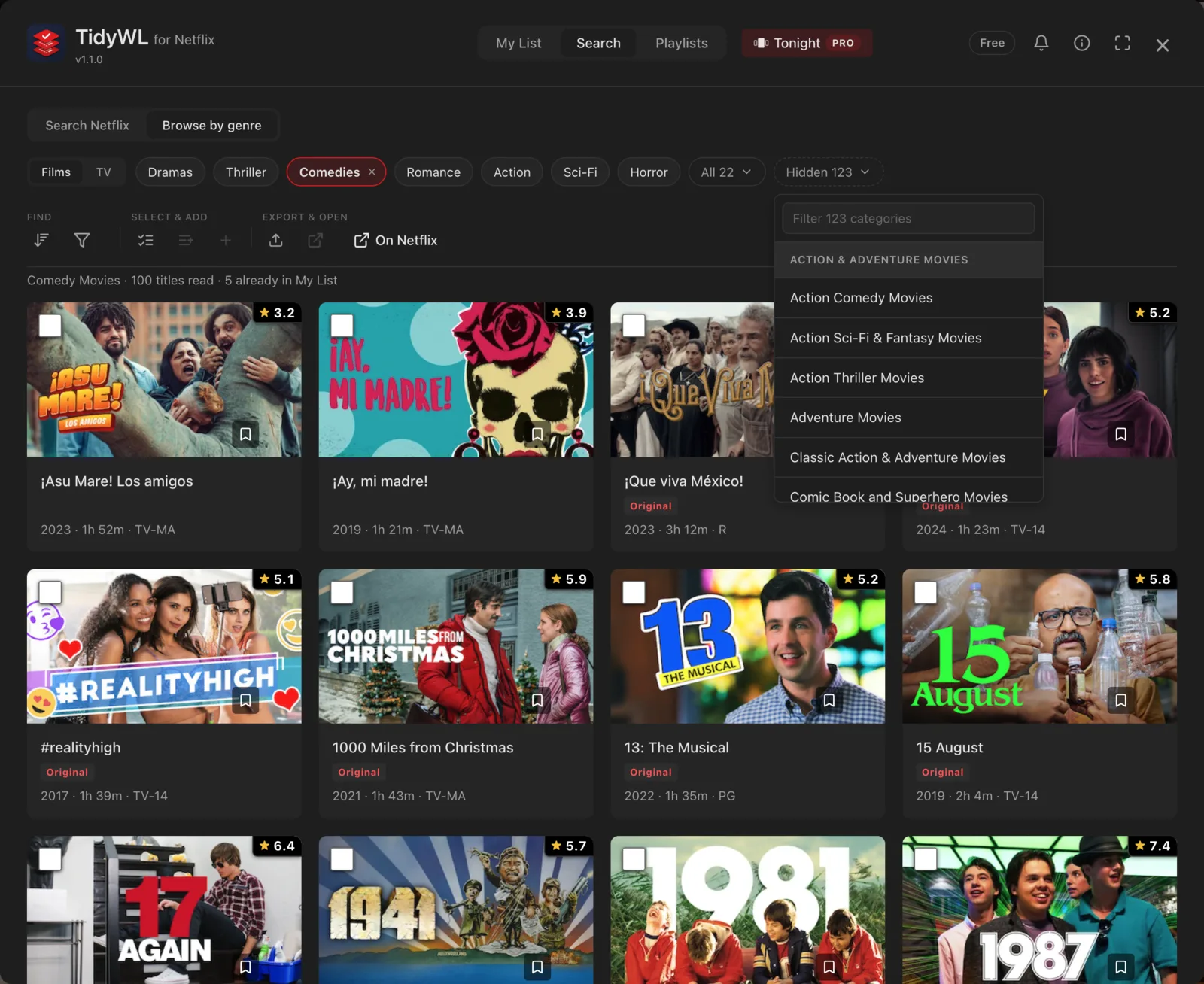
My List gets the same treatment: open it with Alt+L and sort it by IMDb rating, runtime, year, title or type. The one sort it cannot give you is date added, because Netflix's website never says when you added a title. For that, the phone app is still the answer.
Two things to know. It sorts inside its own dashboard, laid over the Netflix page, not on Netflix's own pages. And it runs in Chrome on a computer. It is free, with no account, and it is not made by or affiliated with Netflix. Add Watch Later Tidy for Netflix to Chrome.