
The evening that goes nowhere
You open Netflix wanting to watch something. Twenty minutes later you have saved a few more titles to My List, started none of them, and put on an old show you have already seen.
That is not an invented scene. It is how one person described their nights in an r/netflix thread from June 2026 about struggling to pick something to watch, and with well over a hundred replies it was the busiest thread on the subject I found. It is far from the only one:
- On r/whattowatch, someone described scanning menus for most of an evening, their saved lists included, across several streaming services, and then going to bed.
- People post their own list and ask strangers to choose for them, on r/whattowatch and on r/netflixindia.
- One person on r/netflix wanted to export a very long list into a random picker wheel, just to get past the decision fatigue.
And it is not new. Back in 2023, a Hacker News commenter described "scrolling through the My List on Netflix for minutes unable to pick anything".
Why My List does not help
My List is meant to be the answer: save it now, watch it later. But a list only helps you choose if it gives you something to choose by. On Netflix's website, My List shows a picture and a name, in an order Netflix decides. The runtime, the year and anything about whether it is good wait until you click in. And the list only ever grows, with titles you have finished still on it. Since September 2026 it is also a single row on a page called My Netflix.
So the list gets longer, and choosing from it gets harder.
What Netflix itself tried
Netflix has had a go at this. In 2021 it launched a shuffle button, Play Something, later renamed Surprise Me, and removed it in 2023. A Netflix spokesperson told the Wall Street Journal it was dropped for low usage, because members usually open Netflix meaning to watch a particular title or genre, as Android Police reported.
My reading of that: a random title from the whole catalogue is not what people want. They want help choosing among the things they already saved, for the time and the mood they have tonight. Netflix's phone apps did add filters to My List in 2023, such as movies or shows and started or not, which helps narrow it, but not choose.
What helps, with or without an extension
- Decide the frame first. How long do you have, who is watching, what mood? Then look only at what fits. Opening one genre beats scrolling the home page.
- Let someone else pick. A friend, a partner, or a subreddit. People do it every day on r/whattowatch.
- Keep a short list outside Netflix. People describe spreadsheets, note apps, IMDb watchlists and Trakt for this. The shorter the list, the easier the choice.
- Use a tool that reads your list. Watchlist Boosted, for one, imports your My List and lets you sort it by rating and filter it by mood.
How TidyWL for Netflix helps
I build TidyWL for Netflix (on the Chrome Web Store as Watch Later Tidy for Netflix), so read this with that in mind. It approaches the problem in two steps.
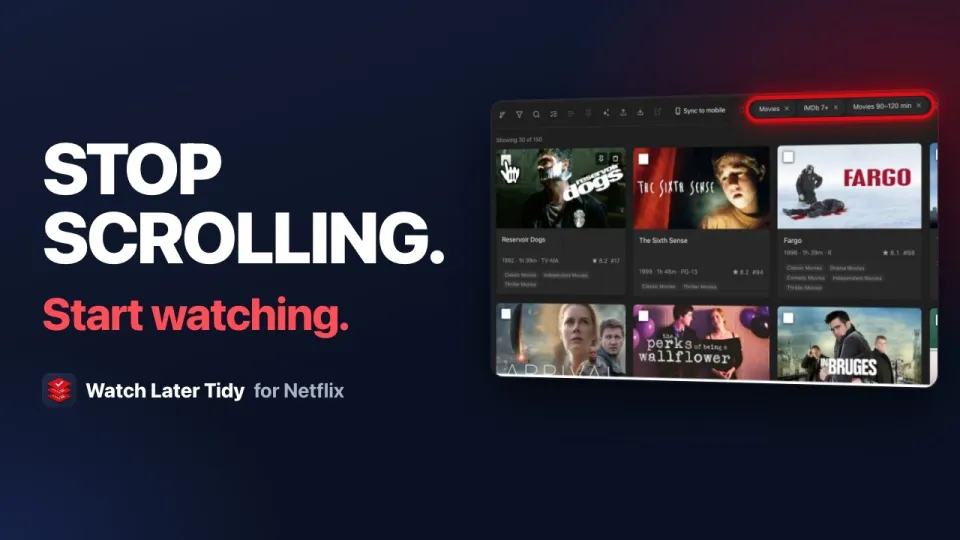
Free: make the list choosable. Press Alt+L on any Netflix page and your whole My List opens as a grid. Every card carries the IMDb rating, the runtime, the year, the genre and the maturity rating. Filter it down by type, genre, IMDb rating, runtime and whether you have already watched it, then sort what is left by IMDb rating. Keep shortlists as playlists, such as Weekend, Under 90 minutes or With the kids. Five playlists are free.
 2:18
VideoHow I Stopped Wasting Time Picking a Netflix MovieThe free way: filter a long My List down to a handful worth watching.
2:18
VideoHow I Stopped Wasting Time Picking a Netflix MovieThe free way: filter a long My List down to a handful worth watching.
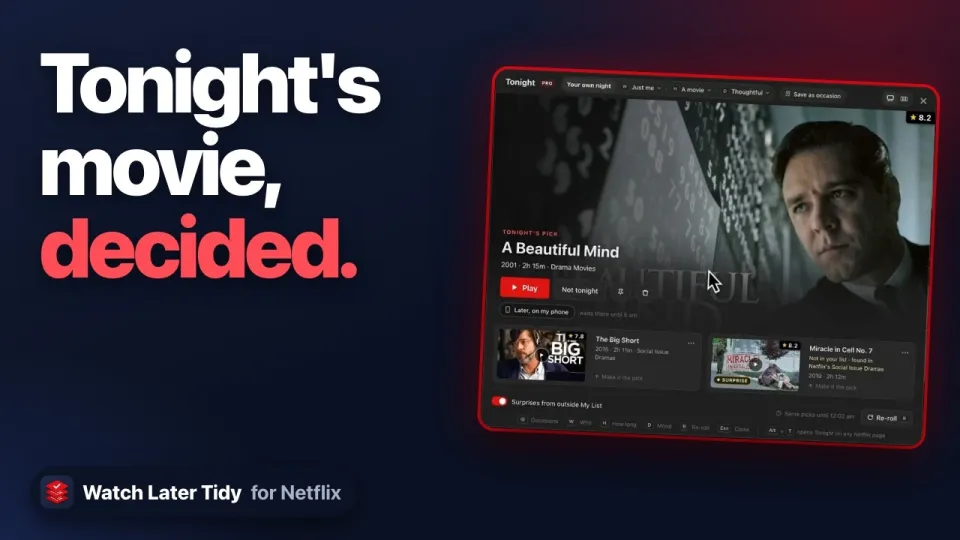
Pro: Tonight picks for you. Say who is watching (just you, a partner, friends or family), how long you have and what you are in the mood for, in three taps. Tonight deals one pick and two backups from your My List, each with its reason: the IMDb rating, the runtime, the genre that fits. With family, it leaves out anything rated above your youngest viewer. Re-roll for three more. "Not tonight" hides a pick for a week, and a title you keep putting off is flagged in My List so you can finally let it go. Unless you switch surprises off, it also offers titles from outside My List that fit your mood, never one you have already watched or given a thumbs down. Press Alt+T on any Netflix page.
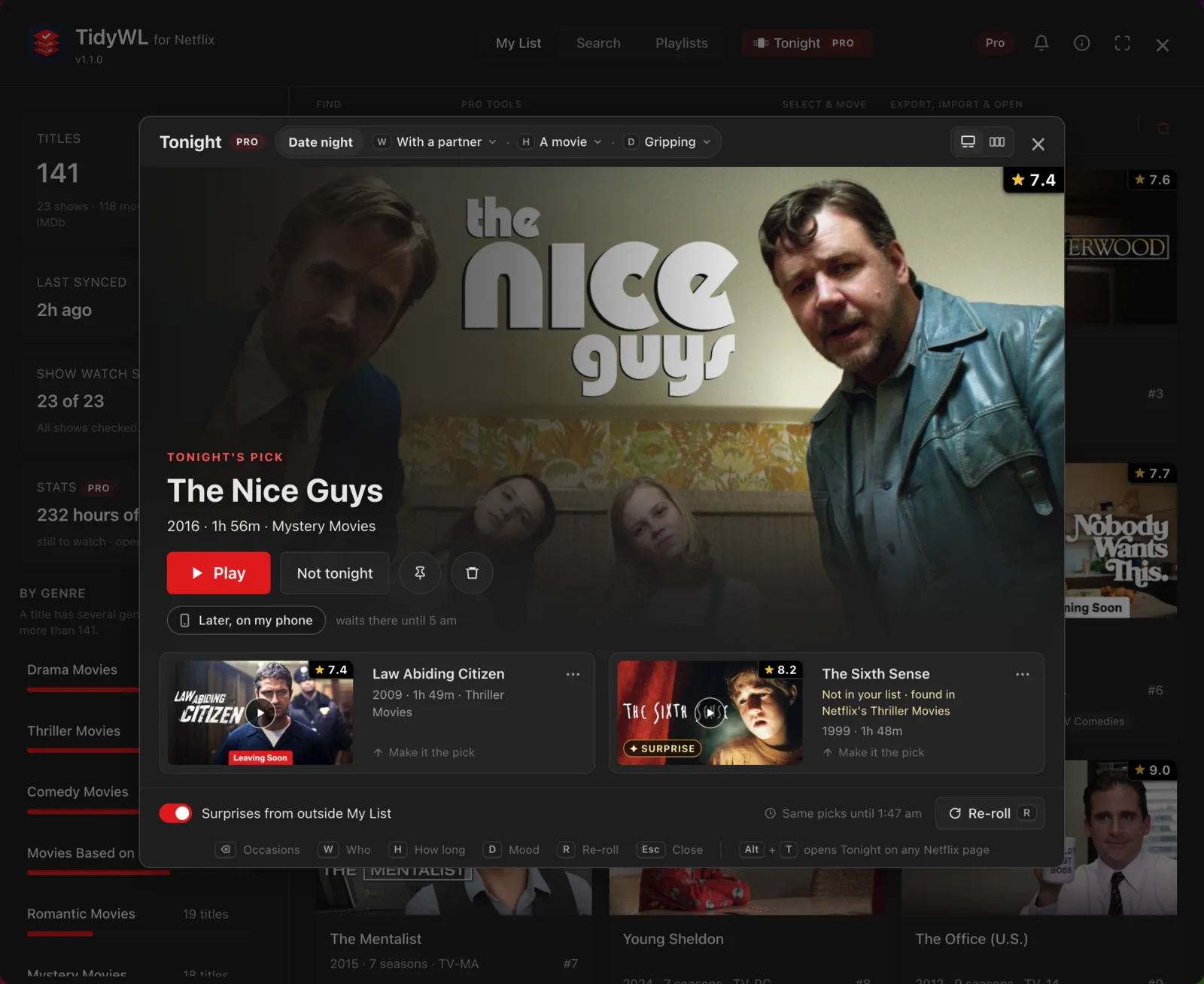
Tonight is part of Pro, which starts with 7 days free, card required: cancel before day 8 and you pay nothing. After that it is $3.99 a month or $29.99 a year. Everything in the free part stays free.
It runs in Chrome on a computer, needs no account, and is not made by or affiliated with Netflix. Add Watch Later Tidy for Netflix to Chrome.
 0:45
VideoWhat to Watch on Netflix Tonight?Tonight, part of Pro: three taps, one pick and two backups.
0:45
VideoWhat to Watch on Netflix Tonight?Tonight, part of Pro: three taps, one pick and two backups.